

Your Phone Shares Your Data With Companies You’ve Never Heard Of
In this article:
Would you be willing to pay over $1,000 for someone to follow you around all day, recording where you go, what you buy, who you speak to, and what you talk about?
And every night, this person collates all the information and reports it back to people that you have never met.
You would never accept such an intrusion, let alone pay good money for it!
But that is exactly what you are already doing.
Instead of a person following you, you carry around a wonderfully convenient device with a beautiful screen, a great camera, and so many useful apps.
And this device probably accompanies you everywhere - including the bedroom or even the bathroom.
You might have already guessed that I’m talking about your phone.
And it is collecting data about you right at this very moment - even if you think you’ve switched the tracking off.
'But I don't have anything to hide!'
Well, data collection is only the first step.
What most people don’t realise is that your data is constantly being auctioned off to the highest bidder.
And chances are you’ve never even heard of the companies buying it.
Companies like Google and Microsoft auction your data to data brokers through large data exchanges. This is called ‘Real-Time Bidding’ (RTB).
It is then sold on to companies for advertising purposes. Once sold, it can end up in the hands of any company in any country and be used for any purpose.
Between 2018 and 2020, a company called Mobilewalla collected the locations of more than 500 million phones, including from unsuccessful auction bids, and sold access to advertisers and other data brokers.
That’s right - even the companies that bid for your data can see it, whether they win the auction or not. They aren’t supposed to keep it, of course, but Mobilewalla did.
And Mobilewalla is just a drop in the bucket. Google alone lets 4,700 companies access data about people in the US.
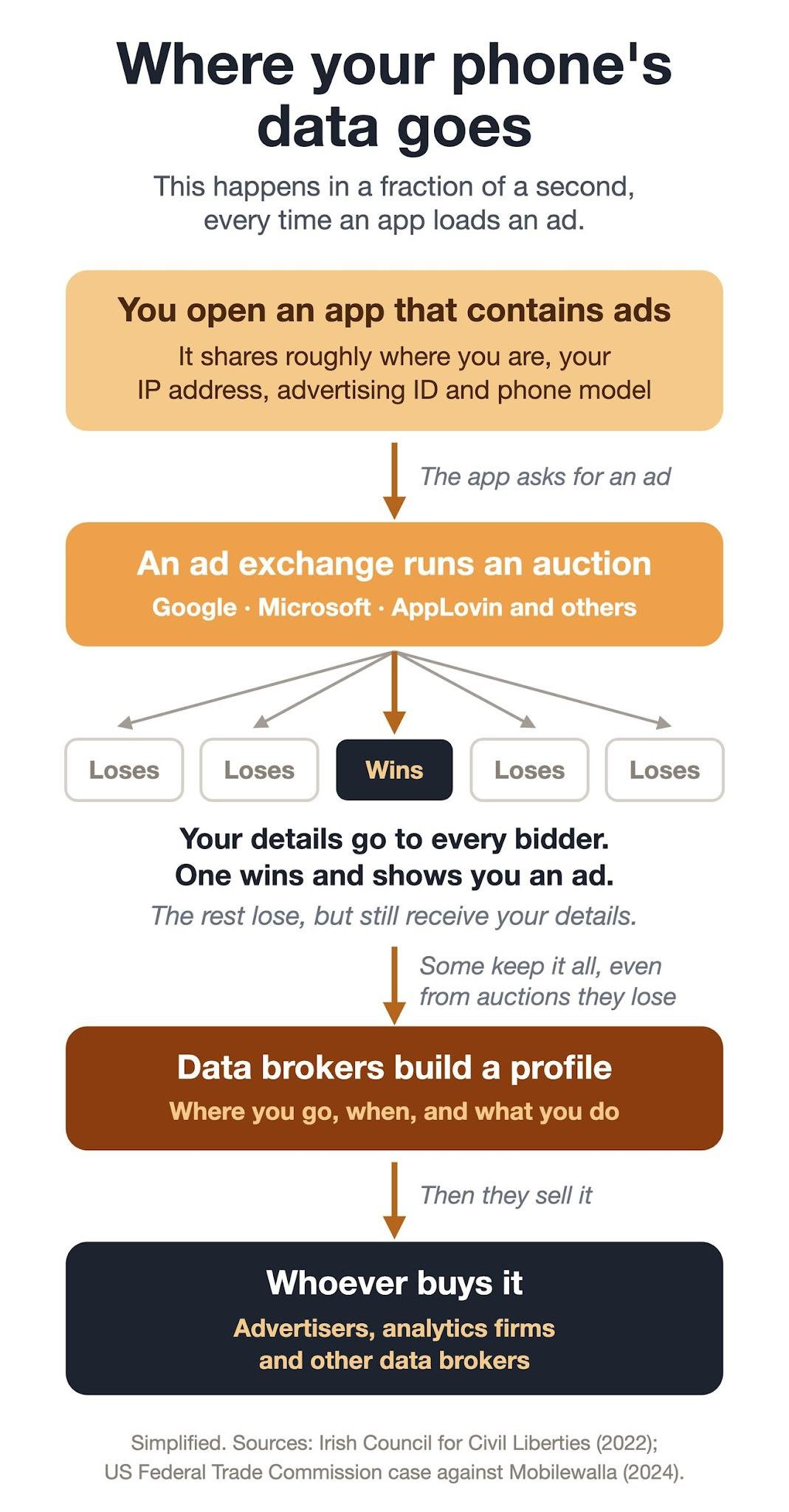
How many of these auctions occur every single day? One report from the Irish Council of Civil Liberties in 2022 estimated 700+ auctions per day for Americans and 400+ for people in the UK.
That’s right - every American’s online activity and location are exposed more than 700 times a day by the RTB industry. Advertisers use that data to build a profile of you.
And if you thought switching your location off protects you - not necessarily.
In 2022, Google was fined $392 million for tracking people who had turned off location sharing.
So we lock down our Bitcoin in self-custody, protect our privacy with smart UTXO management, store all our passwords securely, and don’t share our personal details unnecessarily.
Meanwhile, our phones get a free pass to collect and share data right under our noses, and many of us don't even realise it's happening.
Pretty alarming, right?
So how do I stop my phone sharing my data?
If you are like 99% of people, you are using an iPhone running iOS, or another brand, like Samsung, running Android OS bundled with Google Play services.
In both cases, the company that makes the system is built in and stays connected all day.
You can use settings to limit data sharing, but you cannot cut it out completely. (There are steps that you can take immediately, and I’ve outlined them below.)
On top of that, you have to trust that Apple or Google is doing (or not doing) what they say. And as we have seen, that isn’t always the case.
And the apps themselves add yet another layer. Once an app has your data, you can’t control what it does with that data.
You have a couple of choices. First, you can throw your phone away and go and live off-grid out in the wilderness, eschewing all technology. Without a phone or internet, you can be certain that there is no tracking.
As this is unlikely to be an acceptable solution for you, another option is to change the kind of phone you use.
No, I don’t mean you need to dust off that old Nokia from the nineties.
You can still have all the latest technology, with the apps you are used to, but without all the intrusions on your privacy.
You can replace your existing phone with a ‘privacy phone’ or a ‘de-Googled’ phone.
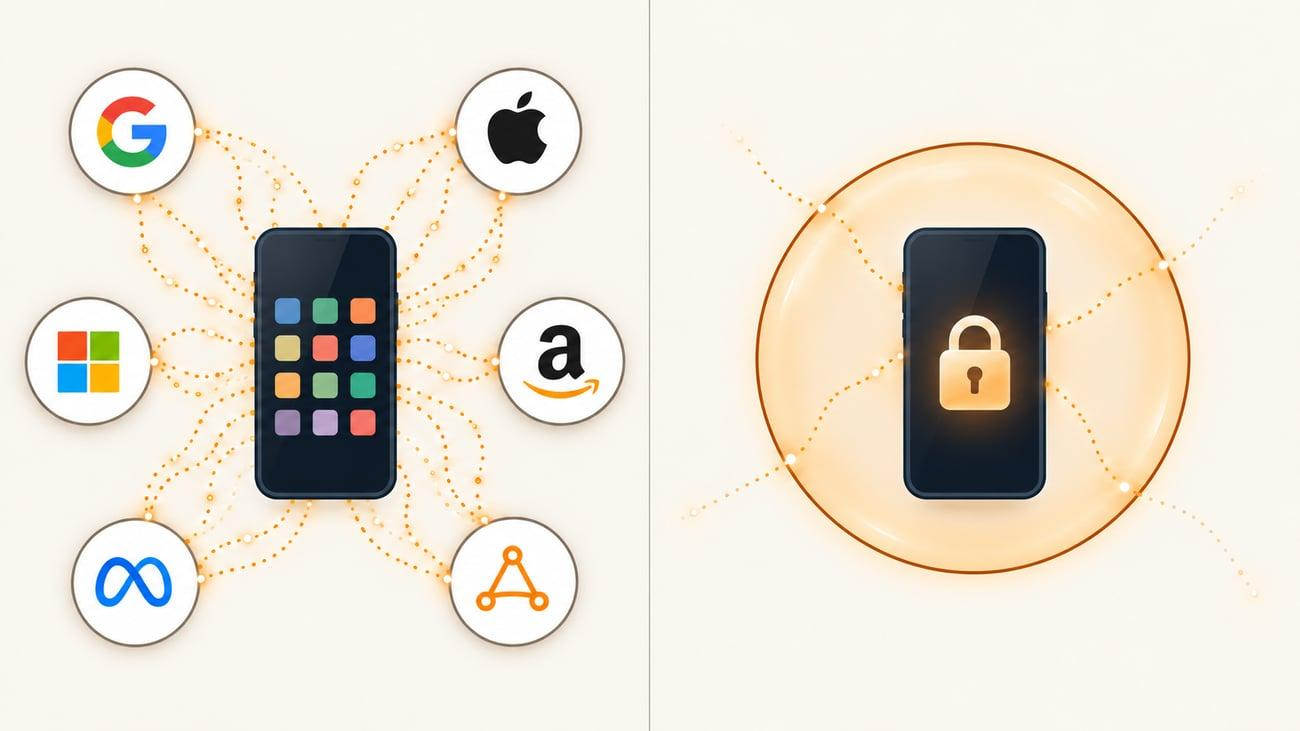
So how do you get your hands on a privacy phone?
Remember that a phone is two things: the device and the operating system.
A privacy phone keeps the device and swaps the system.
Ironically, you can set up a privacy phone on a standard Google Pixel phone.
The hardware is chosen for its security chip, and the Google software is removed and replaced by an open-source operating system called GrapheneOS.
Will a privacy phone work like my regular phone?
The short answer is 'yes', but the setup is a bit different.
1. Apps
There are alternatives to Google Play that let you download apps without even needing a Google account.
One example is Aurora Store, which is an open-source, privacy-focused alternative.
Aurora Store is an app you install on your Android phone. You get it from the Aurora website or from F-Droid.
When you search for an app in Aurora, it fetches that app from Google Play’s own servers, the same place the official Play Store gets it.
You get the same apps, the same files, and the same updates. The difference is which app downloads them and how much Google learns about you.
You can still install apps directly from the Google Play Store when using GrapheneOS, but they're treated like ordinary apps that don’t get special access to your phone.
This contrasts with a standard Android phone, where Google Play and the Google services behind it are built into the system with permissions ordinary apps can never get.
These include privileged permissions, fixed phone identifiers, installation and updating of apps without permission, and location sharing.
2. User Profiles
A privacy phone running GrapheneOS can have multiple user profiles, meaning you can split your apps.
This is one of the biggest advantages over a regular phone.
Profiles work like separate phones inside one. Your bank, your Bitcoin, and your social media each have their own space, and none of them can see into the others.
This means:
- Data-hungry apps can’t see the rest of your life.
- Google stays in its corner. If you need Google Play to download certain apps, like banking apps, you can limit it to just one profile.
- Apps that you aren’t using stop running.
- You can keep separate identities that don’t get linked together.
- You can keep a clean profile for travelling.
Some Android phones can do a version of this, but Google is still built into every one.
Five steps you can take NOW for improved privacy
Privacy exists on a spectrum, and there is no such thing as perfect privacy (unless you plan to leave civilisation entirely!)
But you can take steps right now to stop sharing your data unnecessarily.
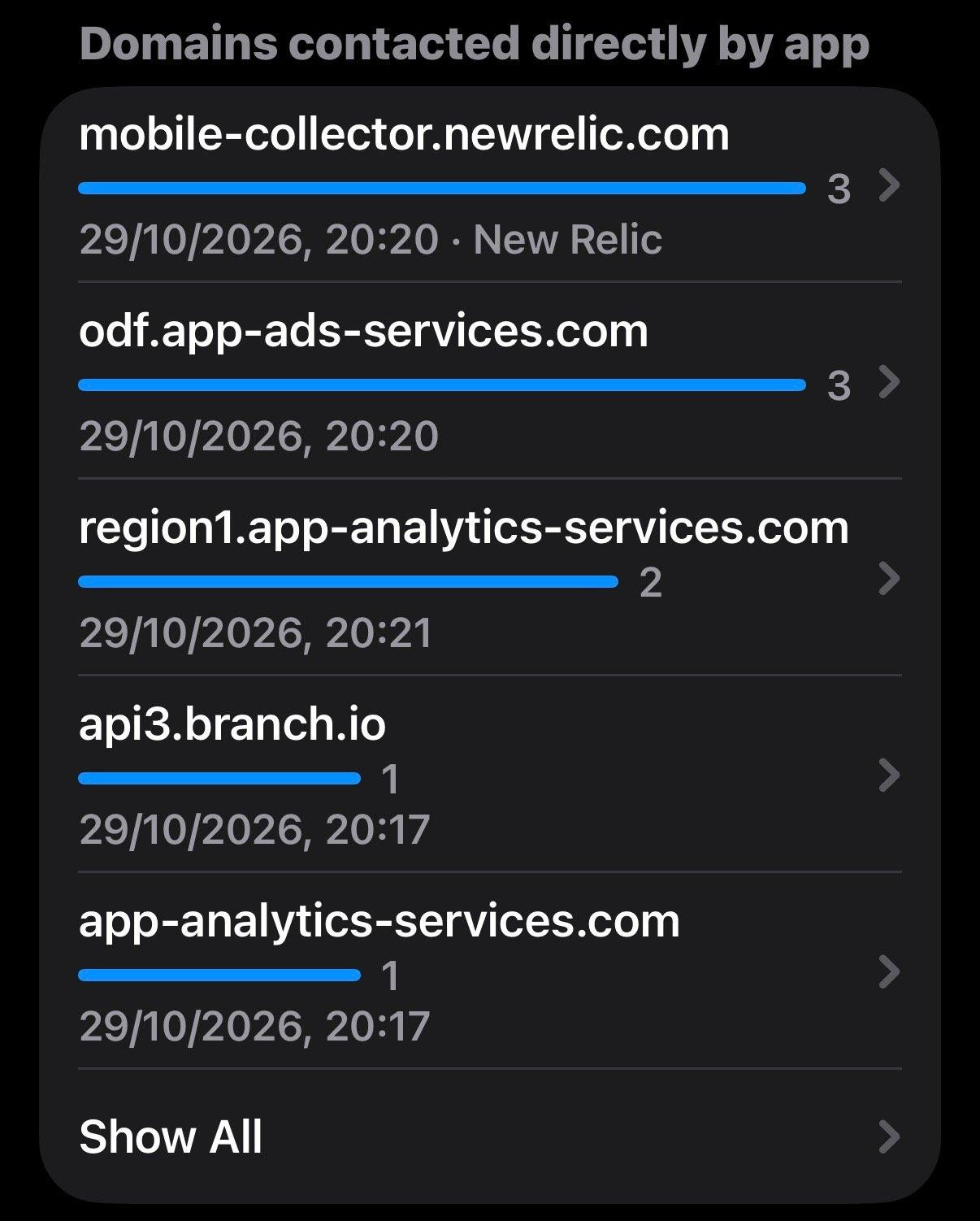
1. Find out what your apps are actually doing - if you have an iPhone, turn on the App Privacy Report (under Settings > Privacy & Security). It shows which apps used your location, microphone, camera, and contacts, and which websites they contacted. In Android 12 or later, search settings for ‘Privacy Dashboard’.
Look out for Analytics, which are services that report how you use the app, and Ad networks, where the ad requests and auctions start.
These are the privacy concerns. You can often spot them by names containing “ads”, “analytics”, “doubleclick”, “app-measurement”, “adservice”, “applovin”, “unity” or similar.
This is an example from a popular flight booking aggregator app:
2. Delete any apps that you haven’t used for more than a month. Stay on top of extra apps that you download and never end up using - clean them out regularly.
3. Set location to "While Using" or "Never", app by app. On iPhone, also switch off ‘Precise Location’ for any app that doesn't give you directions.
4. Turn off the advertising ID. On iPhone, switch off "Allow Apps to Request to Track" (Settings, Privacy & Security, Tracking). On Android, search Settings for "Advertising ID" and delete it.
5. Consider replacing your current phone with a de-Googled privacy phone. You will need to purchase an unlocked Google Pixel 8 or newer. You can then install GrapheneOS to replace the existing Android OS, set up user profiles, and install your essential apps.
Since you don't have a backup to restore from, you will need to set everything up manually. You will not be able to bring things like photos, contacts, and two-factor authentication codes over automatically.
It is also a good idea to run your new phone alongside your old one for a while to make sure you have everything covered.
It’s time to fire that spy in your pocket and take back control over your data.
You pay a lot of money for the latest smartphone, so why should you also hand your data over to big tech companies to profit from it?
So stick it to Google, Apple, Microsoft, and all the companies that make billions from tracking you.
You are a person, not a set of data points, and you have the right to keep your private life private.